
TUI
Memories tab
The Memories tab is the default view when you open the TUI. It displays every memory stored for the current project in a split-panel layout: a scrollable list on the left and a full detail pane on the right.
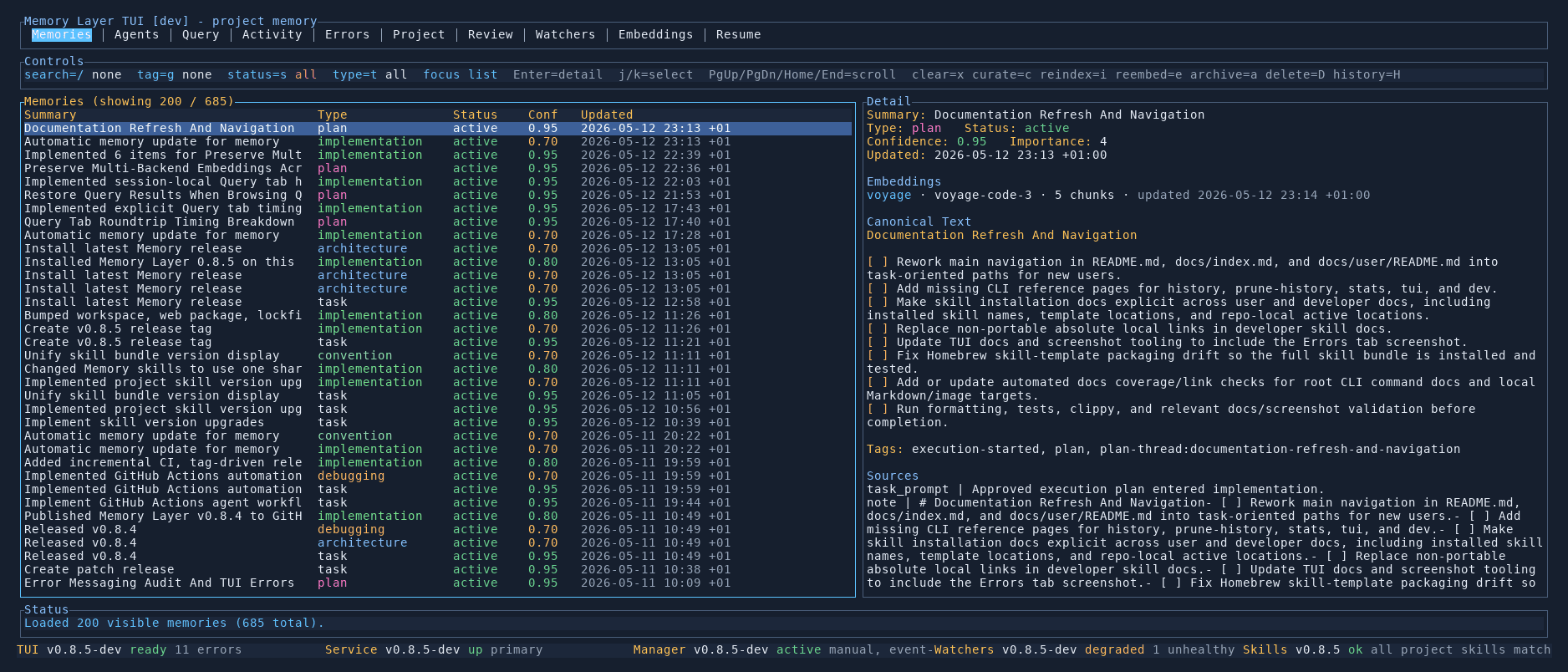
List panel
The left panel shows all memories as a table with columns for the summary title, type (task, implementation, architecture, plan, debugging, convention), status, confidence score, and last-updated timestamp. Rows are colour-coded by type so you can scan at a glance.
Use j/k to move between entries, PgUp/PgDn to scroll quickly, and Home to jump to the top.
Filtering
The controls bar above the list provides filters and toggles:
- Type filter — show only specific memory types (e.g. only
planorarchitecture) - Status filter — filter by
activeorarchived - Focus list — narrow the view to a subset based on tags or file paths
- Sort order — switch between chronological and deterministic ordering
Detail panel
Selecting a memory in the list populates the right panel with its full content:
- Canonical text — the distilled, self-contained statement of the memory
- Type, status, and confidence — classification and trust score
- Tags — all associated labels for filtering and categorisation
- Embeddings — which providers have indexed this memory and how many chunks each produced
- Source — the original user request, task prompt, or event that created the memory
- Thread and provenance — links back to the plan or session that produced it
Controls
| Key | Action |
|---|---|
j / k | Move up/down in the list |
PgUp / PgDn | Scroll by page |
Home | Jump to first entry |
Enter | Toggle detail focus |
a | Archive the selected memory |
c | Open curation for the selected memory |