
Resume tab
The Resume tab generates a context-recovery briefing so you or your agent can pick up exactly where work left off. It combines checkpoint data, recent activity, and pending items into a single structured summary.
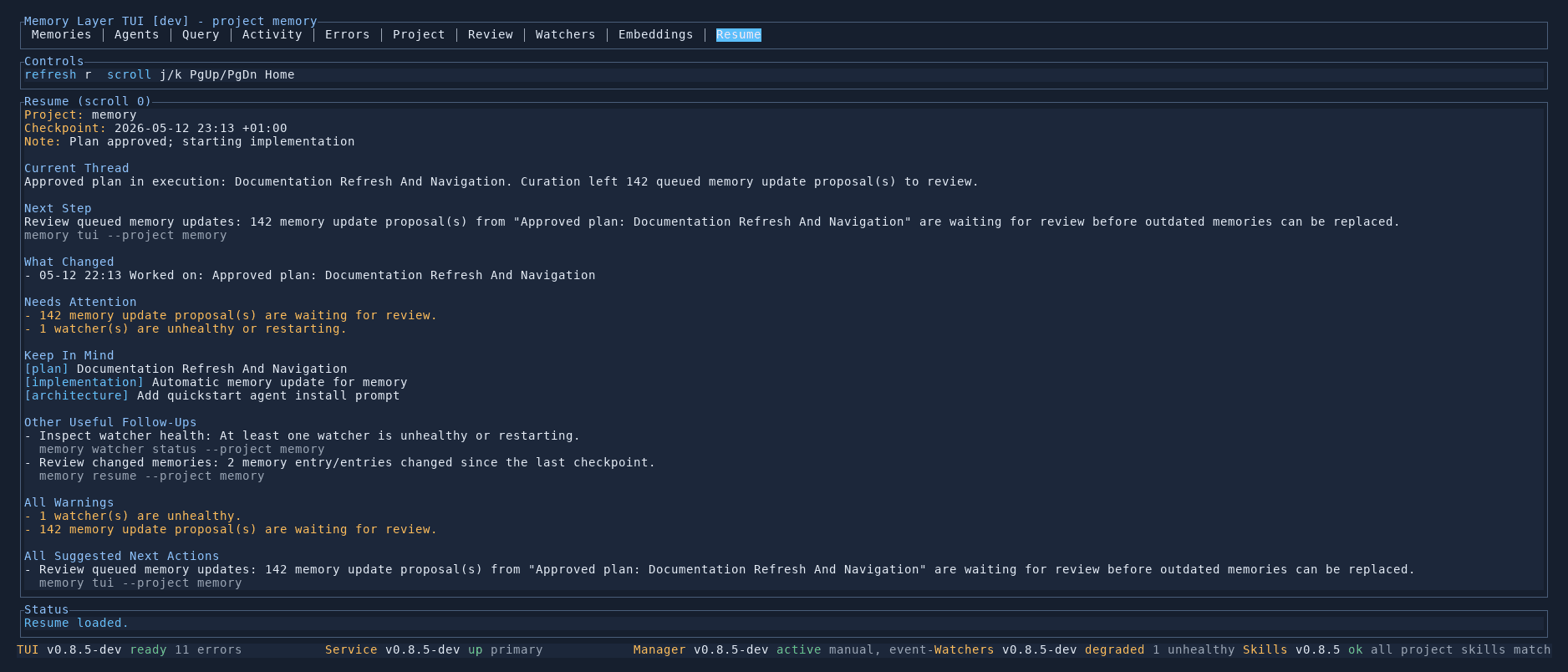
Briefing structure
The resume briefing is organised into sections:
Project and checkpoint
Shows the project slug, the timestamp of the last checkpoint, and any note attached to it (e.g. "Plan approved; starting implementation").
Current thread
Identifies what was being worked on — the active plan or task thread — and any pending curation proposals that need attention.
Next step
A concrete, actionable recommendation for what to do next, including the CLI command to run.
What changed
A chronological list of recent work since the last checkpoint, with timestamps and descriptions.
Needs attention
Highlighted warnings for items that require immediate action:
- Pending curation proposals waiting for review
- Unhealthy or restarting watchers
- Other degraded components
Keep in mind
A list of the most relevant active memories — plans, implementations, and architectural decisions — that provide context for the current work.
Suggested follow-ups
Additional actions beyond the immediate next step, each with the specific CLI command to run.
Controls
| Key | Action |
|---|---|
j / k | Scroll through the briefing |
PgUp / PgDn | Scroll by page |
Home | Jump to top |
r | Refresh the resume briefing |